Odometer, Adapting
Odometer, Adapting
=> [ Distance Impulse Number, Reading ]
• Total distance travelled by the vehicle can be read from the malfunctioning instrument cluster or determined by vehicle service history.
• Total distance travelled display of new instrument cluster must not be more than 100 km (63 mi) before adaptation.
• Total distance travelled to be transferred to the new instrument cluster must exceed 100 km (63 mi).
• Adapting total distance travelled is only possible once and only in a positive (upwards) direction.
• Adaptation can be interrupted with the C button of the scan tool (VAG 1551/1552)
• Correcting a false entry which has been confirmed is not possible. The instrument cluster must be exchanged for a new one.
• For US models, the country code must first be changed to "Canada " before entering the adaptation value.
• Adaptation value on instrument clusters must be entered in kilometers. For US models, adaptation value must be converted from miles to kilometers first (miles x 1.609 = kilometers).
Example
The malfunctioning instrument cluster has an odometer display of 89627 (either kilometers or miles). The odometer display can be transferred to the new instrument cluster as follows:
- Connect scan tool (VAG 1551) , select 1 "Rapid Data Transfer", switch on ignition, input address word 17 "Instrument cluster".
- Press Q button to confirm input.
Various data appears in the display. The manufacturer's code is also displayed.
• US vehicles from MY 1999, must temporarily be changed to "Canada ", => [ Function 07 - Coding Instrument Cluster].
Indicated on display:
Rapid data transfer HELP
Select function XX
- Press button 1 twice to select " Login Procedure" function 11
- Press Q button to confirm input.
Indicated on display:
Rapid data transfer Q
11 - Login procedure
- Press Q button to confirm input.
Indicated on display:
Login procedure Q
Input code number XXXXX
- Input code number 13861.
Indicated on display:
Login procedure Q
Enter code number 13861
If a wrong code is entered, "FAIL" appears in odometer display.
In this case, battery terminal 30 must be disconnected and reconnected and the login procedure repeated using the correct code.
- Press Q button to confirm input.
Indicated on display (select function):
Rapid data transfer HELP
Select function XX
- Press buttons 1 and 0 to select function 10, "Adaptation".
Indicated on display:
Rapid data transfer Q
10 - Adaptation
- Press Q button to confirm input.
Indicated on display:
Adaptation
Enter channel number xx
- Press buttons 0 and 9 to select channel 09.
Indicated on display:
Adaptation
Enter channel number 09
- Press Q button to confirm input.
- Indicated on display:
Channel 9 Adaptation 0 ->
[ -1 3-]
- Move forward in program by pressing -> button.
Indicated on display:
Channel 9 Adaptation 0 ->
Input adaptation value XXXXX
- Input adaptation value (odometer reading) using scan tool (VAG 1551) / (VAG 1552) button pad.
The last position of the odometer reading must be rounded off to the nearest 10.
For US models, first convert miles to kilometers (e.g., 55704 mi X 1.609 = 89627 km)
An odometer reading of 89627 kilometers produces an adaptation value of:
0 8 9 6 3
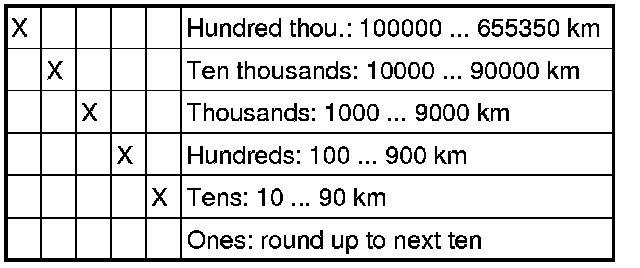
- Input adaptation value using (VAG 1551)/ (VAG 1552) button pad.
Indicated on display:
Channel 9 Adaptation 0 Q
Input adaptation value 08963
- Press Q button to confirm input.
Indicated on display:
Channel 9 Adaptation 8963 Q
[ -1 3-]
- Press Q button to confirm input.
Indicated on display:
Channel 9 Adaptation 8963 Q
Store changed value?
If adaptation value is not correct, e.g. a false entry:
- Press C button to input correct value.
- Press Q button to confirm input.
Indicated on display:
Channel 9 Adaptation 8963 ->
Changed value is stored
- Press -> button to complete adaptation sequence.
• For Canadian vehicles, the procedure is now complete.
• For US vehicles, instrument clusters must now be returned from kilometers to miles (change country code) => [ Function 07 - Coding Instrument Cluster].
Indicated on display (select function):
Rapid data transfer HELP
Select function XX
- Press buttons 0 and 6 to select function 06 "End output".
Indicated on display:
Rapid data transfer Q
06 End output
- Press Q button to confirm input.
Indicated on display:
Rapid data transfer Help
Enter address word XX
The scan tool returns to the start of the program sequence.
Distance Impulse Number, Reading
The distance impulse number ("K number") is a constant used by the instrument cluster to calculate speed and distance travelled.
• The distance impulse number (K number) is preset from the manufacturer and cannot be changed.
• To change the distance travelled number, a code number corresponding to the vehicle engine/gearbox combination must be entered using function 07 " Code Control Module".
• For instrument clusters with a display in miles, the distance impulse number will still be displayed for kilometers.
• Distance impulse number for miles can be converted to kilometers (Distance impulse number for kilometers x 1.609 = distance impulse number for miles).
• Interrupt reading of distance impulse number by pressing C button on scan tool (VAG 1551).
- Connect scan tool scan tool (VAG 1551), select operating mode 1 "Rapid data transfer", switch on ignition and enter address word 17 "Instrument cluster".
After control module identification and immobilizer identification number are displayed:
- Press Q button to confirm input.
Indicated on display (select function):
Rapid data transfer HELP
Select function XX
- Press buttons 1 and 0 to select function 10 "Adaptation".
Indicated on display:
Rapid data transfer Q
10 - Adaptation
- Press Q button to confirm input.
Indicated on display:
Adaptation
Enter channel number XX
- Press buttons 1 and 6 to select channel 16.
Indicated on display:
Adaptation Q
Enter channel number 16
- Press Q button to confirm input.
Indicated on display:
Channel 16 Adaptation 3355 ->
[ -1 3-]
- Compare distance impulse number for vehicle engine/gearbox combination with table => [ Code Table ] Function 07 - Coding Instrument Cluster, From 10.00.
- Interrupt reading of distance impulse number by pressing C button.
Indicated on display:
Adaptation
Enter channel number XX
- Press "C" button.
Indicated on display:
Rapid data transfer HELP
Select function XX
- Press buttons 0 and 6 to select function 06 "End output".
Indicated on display:
Rapid data transfer Q
06 - End output
- Press Q button to confirm input.
Indicated on display:
Rapid data transfer Help
Enter address word XX
- Switch off ignition.
- Disconnect scan tool (VAG 1551) / (VAG 1552) from Data Link Connector (DLC).