Restraints - SRS Lamp ON/DTC U0001-88 Set
NUMBERJTB00003
MODEL
2007 XK
DATE
21 Dec 2006
SECTION: 501-20B - SUPPLEMENTAL RESTRAINT SYSTEM
Restraints Control Module (RCM) Configuration
AFFECTED VEHICLE RANGE:
New XK
VIN:
All
Model Year:
2007
CONDITION SUMMA:
RESTRAINTS CONTROL MODULE (RCM) CONFIGURATION
NOTE:
Certain vehicles may be subject to Jaguar Service Action S856 "Software Enhancement Program" which addresses the situation noted in this bulletin.

DDW should be reviewed for VIN applicability prior to proceeding with this bulletin.
If S856 is applicable, complete the Service Action to resolve this concern.
Situation:
This bulletin has been released to inform Retailers that if a customer complains that the Supplementary Restraints System (SRS) light has illuminated and DTC UOOO1-88 has been logged, the RCM must be configured using IDS DVD 104 Patch File 3 or later software. A CAN BUS error is causing the faults.
Action:
Should these concerns be verified and the VIN is not covered by 5856, refer to the Repair Procedure detailed in this bulletin to configure the RCM, with or without a passenger seat track position sensor, using IDS.
PARTS:
No parts required. Information purposes only.
TOOLS:
IDS DVD 104 with Patch File 3 (or later) software installed
WARRANTY:
NOTE:
Repair procedures are under constant review, and therefore times are subject to change; those quoted here must be taken as guidance only. Always refer to DDW to obtain the latest repair time.
DDW requires the use of causal part numbers. Labor only claims must show the causal part number with a quantity of zero.
Normal warranty policy and procedures apply.
REPAIR PROCEDURE
CONFIGURE RESTRAINTS CONTROL MODULE (RCM)
NOTE:
This procedure requires IDS DVD 104 with Patch File3 or later software.
CAUTION:
A Midtronics PSC-550 Vehicle Power Supply must be connected to the vehicle battery during diagnosis and module configuration.
1. Connect the Midtronics PSC-550 power supply to the vehicle battery.
2. Connect IDS to the vehicle and begin a new diagnostic session, by entering the correct VIN for the current vehicle.
3. Follow all IDS on-screen prompts.
4. When prompted "Do you wish to read diagnostic trouble codes?", select "NO" and then press "tick" to continue.
5. When the "Content Model" is displayed select "Vehicle Configuration" tab.
6. From the "Vehicle Configuration Menu" expand the "Module Programming" menu.
7. From the Module Programming Menu, expand the "Configure New Modules" menu.
NOTE:
Beginning with VIN B03409 the passenger seat track sensor was deleted on all vehicles. Some vehicles between VIN B00001 to VIN B03408 had the passenger seat track position sensor deleted. Table 1 provides a VIN list for those vehicles between VIN B00001 to VIN B03408 that DO NOT have the seat track position sensor installed.
NOTE:
IDS will prompt the user with a series of pop-up boxes as follows:
^ "Region" - select "North America"
^ "Restraints occupant classification system (OCS)" -
> up to VIN B09097 - select "Not fitted" after VIN B09097 - select "Fitted"
^ "Is the passenger's seat track position restraints sensor fitted"
> VIN between B00001 to VIN B03408 NOT listed in Table 1 - select "Fitted"
> VIN listed in Table 1 - select "Not fitted"
> VIN B03409 onward - select "Not fitted"
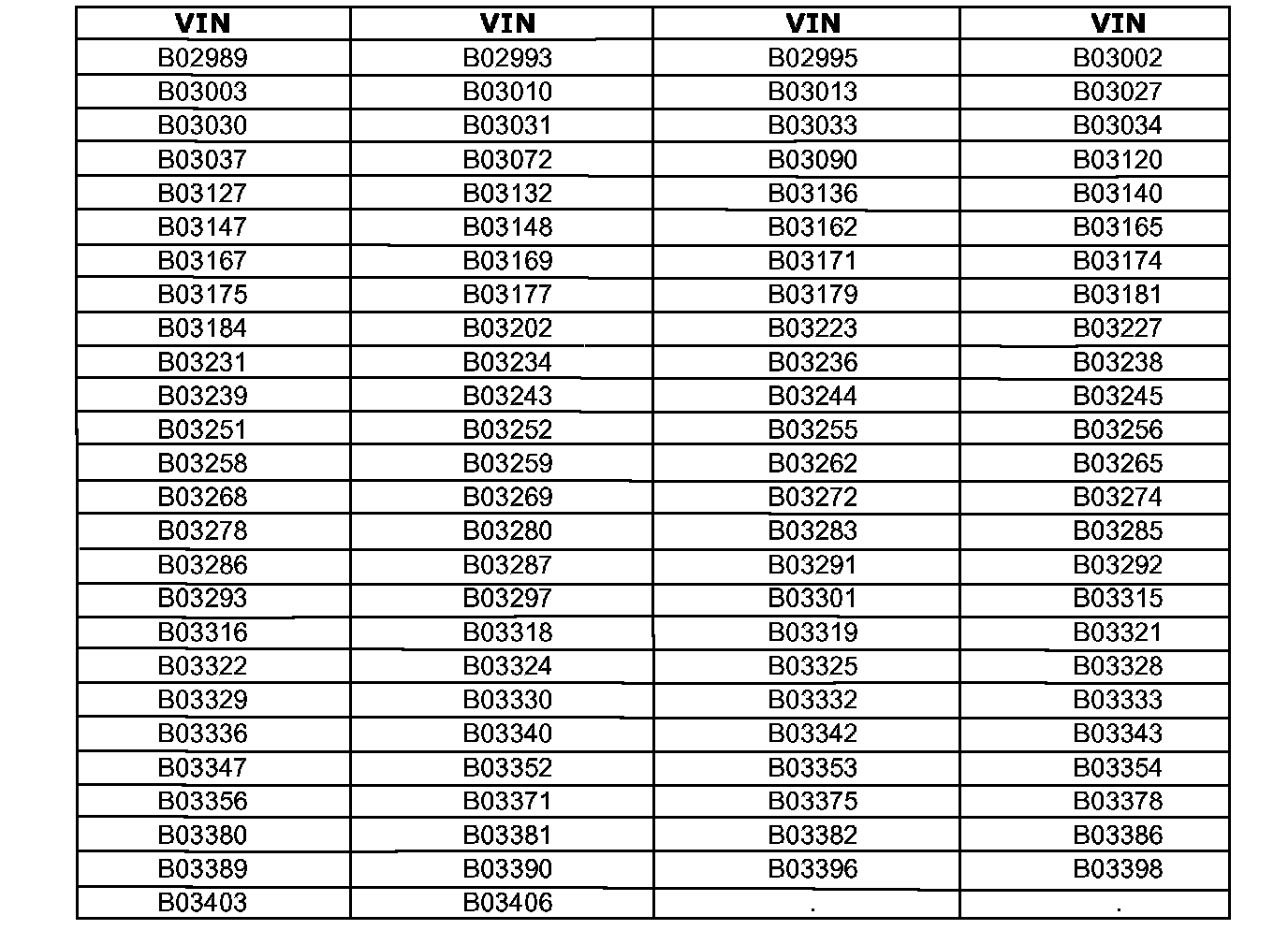
Table 1
8. From the "Configure New Modules" menu, select "Restraints Control Module" and press "tick" to continue.
9. Follow all on-screen instructions to complete this task.
10. When the task is completed, end the current session.
11. Disconnect IDS and the power supply from the vehicle.