A/T Does Not Hold Lock-Up Condition
A/T Does Not Hold Lock-up ConditionSYMPTOM:
The lock-up condition cannot be maintained for more than 30 seconds.
DIAGNOSTIC PROCEDURE
1. CHECK SELF-DIAGNOSTIC RESULTS
Perform self-diagnosis. Refer to SELF-DIAGNOSTIC RESULT MODE, AT104. Diagnostic Procedure without CONSULT-II. Is any malfunction detected by self-diagnostic results? Without Scan Tool
YES >> Check the malfunctioning system. Refer to SELF-DIAGNOSTIC RESULT MODE, AT108, Judgement Self-diagnosis Code.
NO >> GO TO 2.
2. CHECK A/T FLUID LEVEL

Check A/T fluid level. Refer to Checking A/T Fluid.
OK or NG
OK >> GO TO 3.
NG >> Refill ATF.
3. CHECK A/T FLUID CONDITION
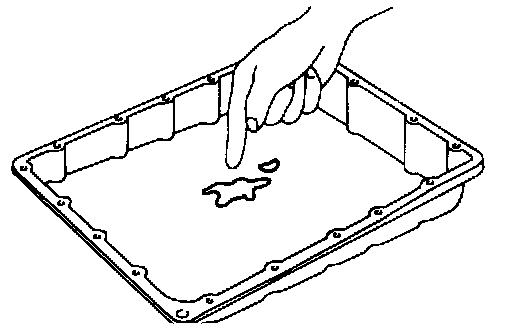
1. Remove oil pan. Refer to Control Valve with TCM and A/T Fluid Temperature Sensor 2.
2. Check A/T fluid condition. Refer to Fluid Condition Check.
OK or NG
NG >> GO TO 7.
4. DETECT MALFUNCTIONING ITEM
^ Check the malfunction items. If any items are damaged, repair or replace damaged parts. Refer to Symptom Chart (Symptom No.25). Symptom Chart
OK or NG
OK >> GO TO 5.
NG >> Repair or replace damaged parts.
5. CHECK SYMPTOM
Check again. Refer to Cruise Test Part 1. Cruise Test Part 1
OK or NG
OK >> INSPECTION END
NG >> GO TO 6.
6. CHECK TCM
1. Check TCM input/output signals. Refer to TCM Input/Output Signal Reference Values. Pinout Values and Diagnostic Parameters
2. If NG, recheck A/T assembly harness connector terminals for damage or loose connection with harness connector.
OK or NG
OK >> INSPECTION END
NG >> Repair or replace damaged parts.
7. DETECT MALFUNCTIONING ITEM
^ Check the malfunction items. If any items are damaged, repair or replace damaged parts. Refer to Symptom Chart (Symptom No.25). Symptom Chart
OK or NG
OK >> GO TO 5.
NG >> Repair or replace damaged parts.