Braking Sensor/Switch: Service and Repair
Service Information
Brake Pedal Stroke Sensor Removal and Installation
Removal
1. Brake Pedal Stroke Sensor
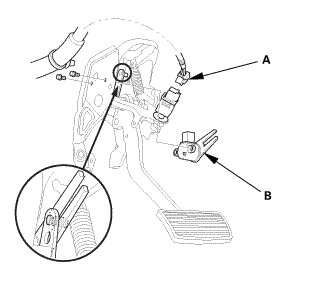
1. Disconnect the connector (A).
2. Remove the brake pedal stroke sensor (B).
Installation
1. Brake Pedal Stroke Sensor
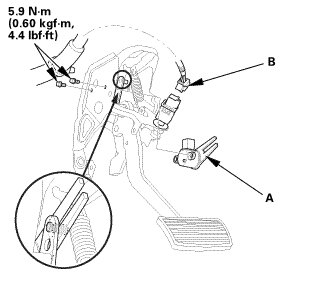
1. Install the brake pedal stroke sensor (A).
2. Connect the connector (B).
2. HDS DLC - Connection
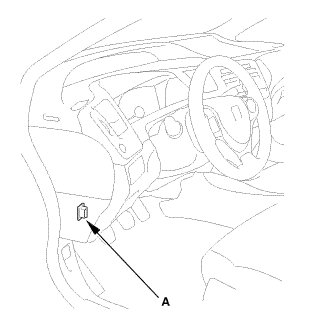
1. Connect the HDS to the data link connector (DLC) (A) located under the driver's side of the dashboard.
2. Turn the ignition switch to ON (II).
3. Make sure the HDS communicates with vehicle. If it does not communicate, go to the DLC circuit troubleshooting.
3. Advanced Hydraulic Booster Memorizing 0 (Zero) Position
1. Clear the DTC(s) by following the screen prompts on the HDS.
2. Turn the ignition switch to LOCK (0), then turn it to ON (II) again.
3. Check for DTCs and make sure no DTC is indicated.
4. Memorize the 0 (zero) position of the brake pedal stroke sensor and the servo unit by following the screen prompts on the HDS.
NOTE:
* See the HDS Help menu for specific instructions.
* If the memorization process does not work, replace the servo unit.
5. Turn the ignition switch to LOCK (0).