Battery, Testing With Midtronics Battery/Starting/Charging System Analyzer MCR340A
Battery Testing
Maintenance-free batteries must not be opened. Otherwise, the warranty is void.
Battery, Testing with Midtronics Battery/Starting/Charging System Analyzer MCR340A
CAUTION!
Risk of injury from battery acid.
• Prior to handling or servicing batteries, read, understand and observe the Warnings and Safety Measures for lead-acid batteries for lead-acid batteries => [ Safety Precautions ] Battery!
• Wear protective eyewear and clothing => [ Protect against injury by using protective
eyewear and clothing. ] Battery.
• If the magic eye has no color or is light yellow, the battery may not be tested or charged. Jump starting must not be used! There is a risk of explosion during testing, charging or jump starting. The battery must be replaced.
• DO NOT battery test batteries which are gassing. Otherwise there is a risk of explosion.
• Dispose of electrolyte (sulfuric acid/water mixture) properly! Waste electrolyte must only be disposed of in appropriate waste disposal sites. Refer to local regulations pertaining to electrolyte disposal.
• The following notes and procedures must be followed to ensure correct measurements.
Special tools, testers and auxiliary items required
• Midtronics Battery/Starting/Charging System Analyzer (MCR340A) (VAS tester illustrated here for reference only)
Procedure
CAUTION!
• Switch off all electrical consumers.
• Switch ignition off and remove ignition key.
• Refer to Midtronics Battery/Starting/Charging System Analyzer (MCR340A) Instruction Manual.
- On battery with charge indicator "Magic Eye", check color display => [ Maintenance-Free Battery with Visual Indicator, Checking Color Display ] .
- Check no-load voltage => [ Battery No-Load Voltage - Vehicles without Energy Management Control Module, Checking ].
- Connect tester cable clamps to battery terminal => MCR340A Instruction Manual. Tester leads must be securely fastened and make proper contact with battery posts.
- Select test mode "IN-VEHICLE" or "OUT-OF-VEHICLE " as appropriate=> MCR340A Instruction Manual.
- Select battery type (AGM or conventional) => MCR340A Instruction Manual
- Set tester to "Warranty Test"=> MCR340A Instruction Manual.
- Perform battery test by setting load current on tester according to battery (DIN) capacity=> MCR340A Instruction Manual.
• Use print function of MCR340A in event test results are required for warranty claims.
Battery test results:
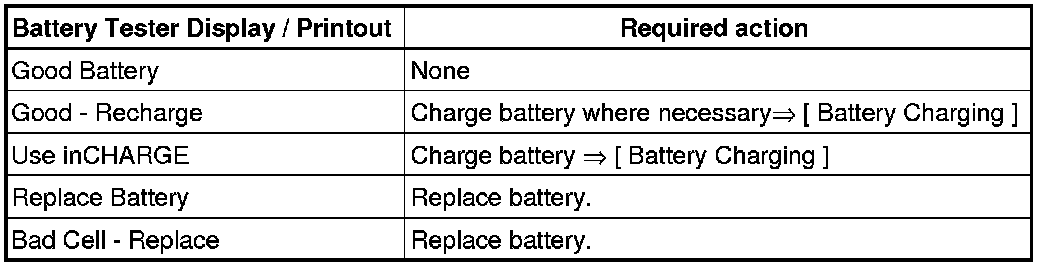
• If battery is replaced, follow disposal regulations => [ Personal injury and environmental risk. ] Battery.