Resetting Without Scan Tool
Resetting Service Interval Display With Adjustment Buttons For Trip Recorder And Clock
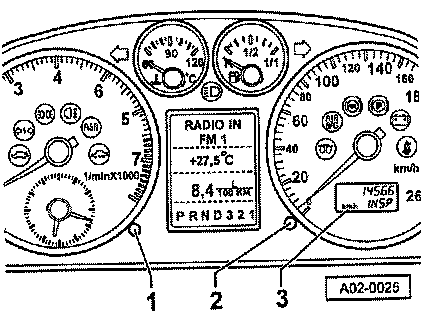
Switch ignition OFF.
Press trip recorder reset button -2- on instrument cluster and at same time switch ignition ON.
The trip recorder display -3- will read: "service OIL".
Release button.
Pull clock adjuster button -1 - on instrument cluster and hold for approx. 2 seconds. This resets "service OIL" display.
Editor note: Audi service procedure says 'pull', it may actually be 'press'.
Note: Depending on the make of the instrument cluster, the display on the trip recorder will either continue to read: "service OIL" (Nippon Seiki) or change to "----" (VDO).
Press trip recorder reset button -2- again to advance to next type of service.
Release button.
The trip recorder display -3- will read: "service INSP".
Pull clock adjuster button -1 - on instrument cluster and hold for approx. 2 seconds. This resets "service INSP" display.
Editor note: Audi service procedure says 'pull', it may actually be 'press'.
Note: Depending on the make of the instrument cluster the display on the trip recorder will either continue to read: "service INSP" (Nippon Seiki) or change to "----" (VDO).
Switch ignition OFF.