Battery, Charging
Battery, Charging
Special tools, testers and auxiliary items required
• Battery Charger (VAS 5903)
Risk of injury. Observe the warnings and safety precautions => [ Dangers When Working with Batteries ] Dangers When Working with Batteries!
Do not check or charge a battery when the visual indicator has no color or is bright yellow. Jump starting must not be used!
There is a risk of explosion during testing, charging or jump starting.
The battery must be replaced.
• The battery temperature must be minimum 10 °C (50° F).
Procedure
• Switch off the ignition and all electrical consumers.
• Remove the key.
- Connect the (VAS 5903). The last selected operation mode is shown on the display. Refer to => [ Battery Charger VAS 5903 ] Battery Charger VAS 5903.
- Press the INFO button to select the battery type.
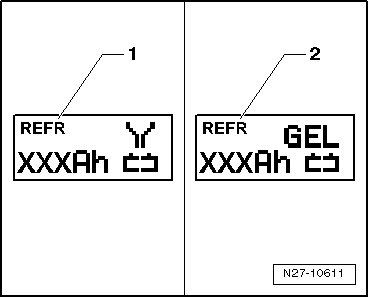
The symbol - 1 - for standard charge of wet batteries or the symbol - 2 - for standard charge of Gel/Absorbent Glass Mat (AGM) batteries is indicated in the display.
- Set the battery capacity (Ah) on the battery to be charged with the corresponding [Up Arrow] or [Down Arrow] button.
- Attach the red charging clamp (+) to the battery positive terminal.
- Connect the black charging clamp (-) to the negative terminal on the battery/negative connector.
The (VAS 5903) recognizes the nominal voltage of the connected battery (6 V/ 12 V /24 V) and begins the charging process automatically.
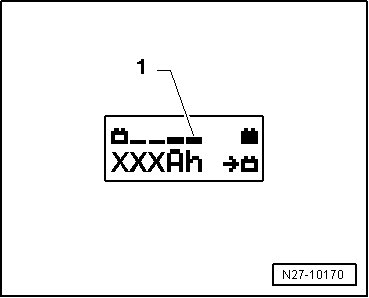
The (VAS 5903) begins the final charging when the charge is approximately 80 - 85%. The fourth bar is indicated on the display - 1 -. The battery is ready for operation.
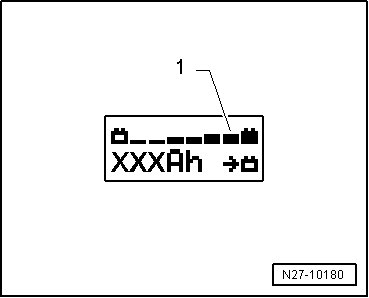
With a charge status of 100%, all bars are indicated on the display - 1 -.
• With the battery type standard charge, parallel operation of consumers during the charging process is possible. The charging time is lengthened by this.
• Depending on the battery type, the (VAS 5903) switches to maintenance charging after 1 to 7 hours. To reach a 100% charge condition, the battery should remain connected to the (VAS 5903).
Possible malfunctions and how they are handled:
1 - Displayed voltage does not match the nominal voltage
- Hold down the [Up Arrow] or [Down Arrow] button until the charging process begins.
2 - Displayed battery voltage does not match rated voltage - charging process has already begun
- Press the START/STOP button two times.
- Hold down the [Up Arrow] or [Down Arrow] button until the charging process begins again.
3 - The charger does not recognize a battery, when the battery voltage is less than 2 volts
The display remains unchanged.
The selected battery type and Ampere hours (Ah) are displayed.
End the battery charging process
- Press START/STOP button.
- Remove the charger clamps from the battery terminals.
- Disconnect the (VAS 5903).