Function 08- Read Measuring Value Block
Function 08- Read Measuring Value Block
The measuring value block is divided into 4 display groups. The assignment of the individual display fields can be taken from the display group overview => [ Read Measuring Value Block Display Groups, Interpreting ] Read Measuring Value Block Display Groups, Interpreting.
Use this function to observe various instrument cluster inputs.
- Connect scan tool (VAG 1551) , select operating mode 1 "Rapid data transfer", switch on ignition and input address word 17 "Instrument cluster".
After control module identification and immobilizer identification number are displayed:
- Press -> button.
Indicated on display:
Rapid data transfer HELP
Select function XX
- Press buttons 0 and 8 to select function 08 "Read measuring value block".
Indicated on display:
Rapid data transfer Q
08 - Read Measuring Value Block
- Press Q button to confirm input.
Indicated on display:
Read Measuring Value Block Q
Enter display group number XXX
- Using the scan tool button pad, enter required display group number (following example shows display group 001). Press keys 0, 0 and 1 for " Display Group number 1" and press Q button to confirm input.
Indicated on display: (1...4 = Display zones)
Read Measuring Value Block 1 ->
1 2 3 4
• Interpreting display groups and evaluating measured values in individual display fields=> tables beginning => [ Read Measuring Value Block Display Groups, Interpreting ] Read Measuring Value Block Display Groups, Interpreting.
• With printer switched on, information on display is printed out.
• To easily change between display groups, proceed as follows:
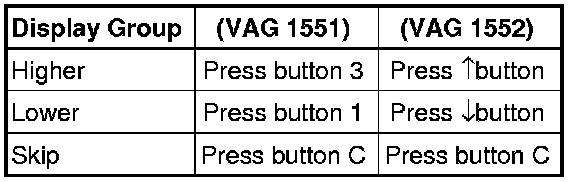
- Displayed after pressing C button.
Indicated on display:
Read Measuring Value Block Help
Enter display group number XXX
- Enter display group number as needed => tables beginning => [ Read Measuring Value Block Display Groups, Interpreting ] Read Measuring Value Block Display Groups, Interpreting.
• Display fields always show actual values transmitted from senders and sensors. However, instrument cluster display values can differ from those in the display fields due to internal filtering.
• Other display groups are possible, but are not required for On Board Diagnostic program!
Read Measuring Value Block Display Groups, Interpreting => [ Read Measuring Value Block Display Groups, Interpreting ] Read Measuring Value Block Display Groups, Interpreting.