DTC Inspection
DTC INSPECTION [Bluetooth SYSTEM (HANDS-FREE TELEPHONE (HF/TEL) SYSTEM)]
NOTE:
- All DTCs displayed in the DTC inspection should be entered in the Audio Repair Order Form.
Using the M-MDS
CMDTC self test
1. Connect the M-MDS(IDS) to the DLC-2.
2. After the vehicle is identified, select the following items from the initialization screen of the IDS.
a. Select "Self Test".
b. Select "All CMDTCs".
3. Verify the DTC according to the directions on the screen.
- If any DTCs are displayed, perform troubleshooting according to the corresponding DTC inspection.
4. After completion of repairs, clear all DTCs stored in the Bluetooth unit. Clearing DTC
ODDTC self test
1. Connect the M-MDS(IDS) to the DLC-2.
2. After the vehicle is identified, select the following items from the initialization screen of the IDS.
a. Select "Self Test".
b. Select "Modules".
c. Select "ACU".
3. Verify the DTC according to the directions on the screen.
- If any DTCs are displayed, perform troubleshooting according to the corresponding DTC inspection.
4. After completion of repairs, clear all DTCs stored in the Bluetooth unit. Clearing DTC
Without Using M-MDS (On-board Diagnostic Test Mode)
1. Switch the ignition to ACC or ON.
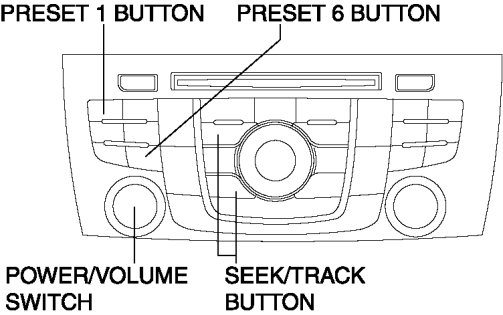
2. While pressing the POWER/VOLUME switch, simultaneously press the PRESET 1 button and the PRESET 6 button for 3 s or more.
NOTE:
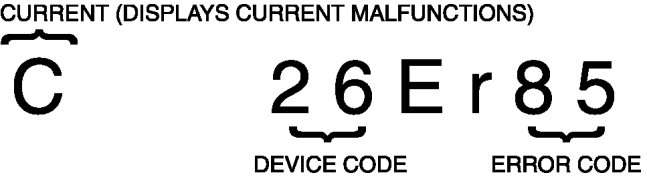
- If several DTCs are in the memory, they can be displayed using the SEEK/TRACK button (up or down).
3. Switch the ignition OFF (LOCK) to stop the on-board diagnostic test mode.